Optimistic vs Pessimistic Locking
Part of the SQL Roadmap
In short
There are two attitudes to conflicts. Lock first and make others wait, or don't lock and check for changes at the last moment. Picking the right one depends on how often people really collide.
Pessimistic locking locks rows up front (SELECT ... FOR UPDATE) and makes others wait. Optimistic locking does not lock; it checks a version number or timestamp at update time and fails if someone else changed the row.
Think of it like this
The padlock and the seal
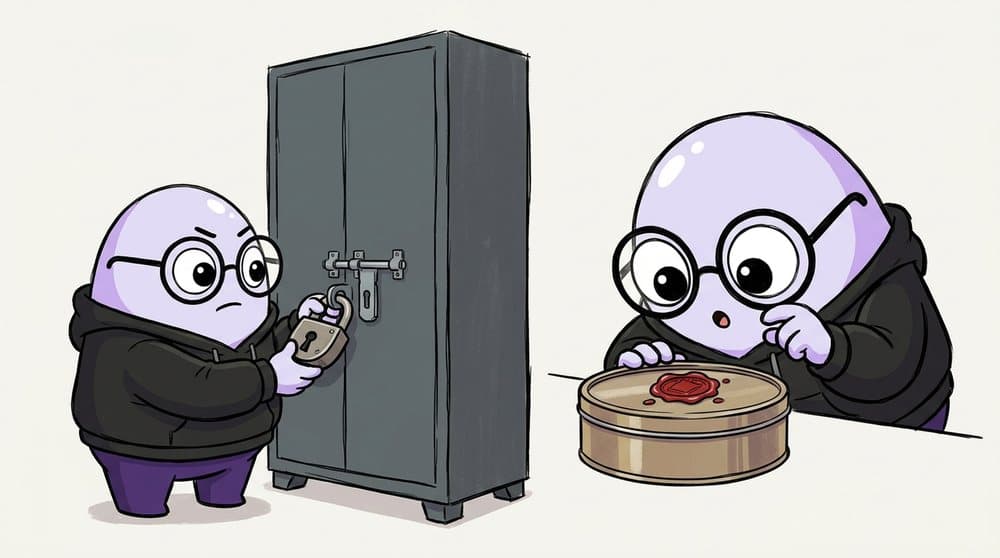
Pessimistic is snapping a padlock on the almirah before you sort it. Nobody else can open it until you're done. Optimistic is leaving it unlocked but noting the number on the wax seal of the sweets tin. When you come back to put the sweets away, if the seal number has changed, someone touched it, so you start again with a fresh look.
Watch it happen
Two ways to stop overwrites
Pessimistic
- SELECT ... FOR UPDATE before changing
- Other writers wait in line
- Never loses an update
- Best when conflicts are frequent, like seat booking
Optimistic
- Read the row and its version number
- UPDATE ... WHERE version = old_version
- 0 rows updated means someone changed it first
- Best when conflicts are rare, like profile edits
Use pessimistic locking for short, contested transactions inside the database. Use optimistic when users read, think for a while, then save.
The big ideas
What you need to know
Pessimistic waits
Lock the row up front. Safe and simple, but others queue behind you, so keep it short.
Optimistic checks a version
Add a version column. Every update checks the old version and bumps it by one.
Detect, then retry
If the optimistic UPDATE touches 0 rows, reload the latest data and ask the user or retry.
Long edits need optimistic
You can't hold a row lock while someone fills a form for five minutes. Version checks handle that.
See it in code
Walk through the code
1-- Pessimistic: lock first, then change2BEGIN;3SELECT seats_left FROM shows WHERE show_id = 77 FOR UPDATE;4UPDATE shows SET seats_left = seats_left - 2 WHERE show_id = 77;5COMMIT;6 7-- Optimistic: remember the version you read8SELECT full_name, phone, version9FROM customers10WHERE customer_id = 310; -- returns version = 411 12-- ...the user edits the form for a few minutes...13 14UPDATE customers15SET phone = '+91 98450 12345',16 version = version + 117WHERE customer_id = 31018 AND version = 4;19-- UPDATE 1: saved. UPDATE 0: someone saved first, reload and retry1/5Seat booking for a show in Hyderabad: contested and quick, so lock the row and make others wait a moment.
Plain SQL that works in PostgreSQL, MySQL and SQL Server. ORMs like Hibernate and Django support the version-column pattern with a built-in setting.
Save yourself the pain
Common mistakes
Oops
Adding a version column but forgetting to check it in the WHERE clause.
Do this instead
The check is the whole point. Always include AND version = :old_version and bump the version.
Oops
Ignoring the '0 rows updated' result.
Do this instead
Treat it as a conflict. Show 'this record was changed by someone else' and reload.
Your mission
Two editors, one record
Quick check
An optimistic UPDATE ... WHERE id = 5 AND version = 3 reports 0 rows updated. What does that mean?
Go deeper
- 1Add a version column and update with WHERE id = ? AND version = ?.
- 2Check the affected row count to detect a conflict and retry.
- 3Decide which approach suits a ticket-booking app versus a profile editor.
More topics at this stop
 Transactions (BEGIN, COMMIT, ROLLBACK)
 ACID Properties
 SAVEPOINT and Partial Rollbacks
 Concurrency Problems (Dirty, Non-Repeatable and Phantom Reads)
 Isolation Levels
 Row Locks and SELECT ... FOR UPDATE
 Deadlocks
 MVCC (Multi-Version Concurrency Control)

Stuck on this topic? Ask an Insider
Get 1:1 guidance from people who've walked this exact path — on the InsideEdge app.
