Filtering in ON vs WHERE with Outer Joins
Part of the SQL Roadmap
In short
You write a LEFT JOIN to keep every customer, add one filter, and half of them vanish. The culprit is almost always a right-table condition placed in WHERE instead of ON.
With a LEFT JOIN, a condition on the right table placed in WHERE removes the unmatched rows and quietly turns it into an inner join. Put that condition in the ON clause to keep all left rows.
Think of it like this
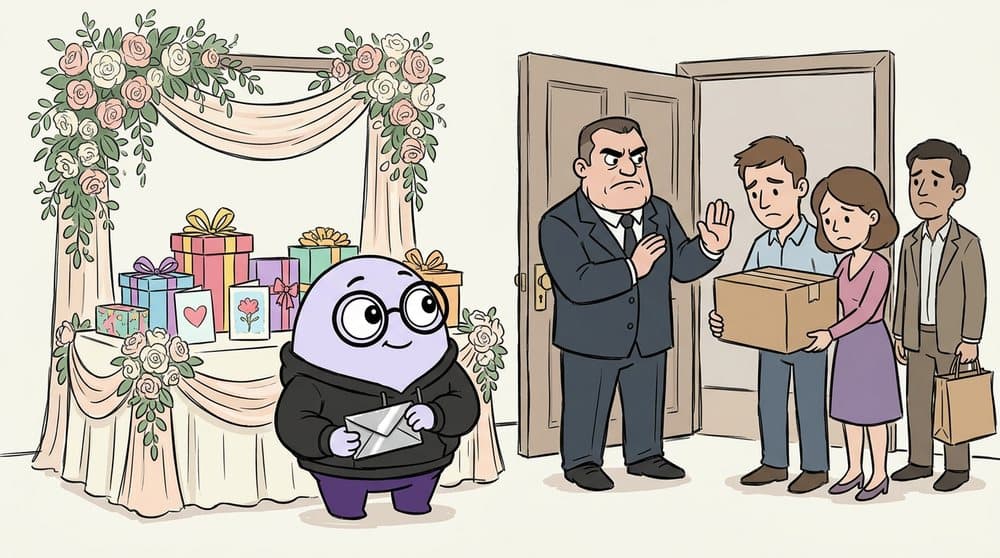
The wedding gift table
At a reception, every guest walks past the gift table. The helper there only records gifts in silver envelopes; other guests are noted as 'no silver envelope' but stay on the guest list. That's a filter in ON. Now imagine a guard at the exit who sends home anyone without a silver envelope. That's the same filter in WHERE, and most guests are gone.
Watch it happen
Same condition, two places
Right-table filter in ON
- Decides which orders may attach to a customer
- Customers with no matching orders still appear
- Their order columns are NULL
- The LEFT JOIN still keeps every customer
Right-table filter in WHERE
- Runs after the join, on every row
- NULL order columns fail the test
- Customers with no matching orders are removed
- Quietly behaves like an INNER JOIN
In a LEFT JOIN, filters on the right table belong in ON. Filters on the left table belong in WHERE.
The big ideas
What you need to know
ON decides matching
Conditions in ON control which right rows can attach. They never remove left rows.
WHERE decides survival
WHERE runs on the joined result. Any condition on a NULL right column fails, so those rows go.
Left filters go in WHERE
c.city = 'Chennai' in ON doesn't remove anyone, it only stops matches. Put it in WHERE.
The one exception
WHERE o.order_id IS NULL is meant to keep only unmatched rows. That's an anti join, and it's correct.
See it in code
Walk through the code
1SELECT2 c.customer_id,3 c.name,4 COUNT(o.order_id) AS october_orders5FROM customers AS c6LEFT JOIN orders AS o7 ON o.customer_id = c.customer_id8 AND o.order_date >= DATE '2026-10-01'9 AND o.order_date < DATE '2026-11-01'10WHERE c.city = 'Chennai'11GROUP BY c.customer_id, c.name12ORDER BY october_orders DESC;1/3The date filter is about orders (right table), so it lives in ON. Customers with no October orders stay.
Every Chennai customer with their October order count, including zeros. The rule is the same in PostgreSQL, MySQL and SQL Server.
Save yourself the pain
Common mistakes
Oops
LEFT JOIN orders o ON ... WHERE o.order_date >= '2026-10-01'
Do this instead
Customers with no October orders have NULL order_date and are filtered out. Move the condition into ON.
Oops
LEFT JOIN orders o ON o.customer_id = c.customer_id AND c.city = 'Chennai'
Do this instead
A left-table condition in ON removes nobody; customers from other cities just get NULL orders. Put it in WHERE.
Oops
Assuming ON and WHERE are interchangeable because they are for INNER JOIN.
Do this instead
For INNER JOIN they give the same result. For outer joins they don't. Check every right-table condition.
Your mission
Spot the vanishing rows
Quick check
In customers LEFT JOIN orders, where should AND o.amount > 1000 go if you still want every customer listed?
Go deeper
- 1Write a LEFT JOIN with a right-table filter in WHERE, then move it to ON and compare row counts.
- 2Explain in one sentence why WHERE removes rows whose right side is NULL.
- 3Check every LEFT JOIN you write for right-table conditions in WHERE.
More topics at this stop
 How Joins Work
 INNER JOIN
 LEFT JOIN
 RIGHT JOIN and FULL OUTER JOIN
 SELF JOIN
 CROSS JOIN
 Joining Multiple Tables
 Anti Joins (Finding Unmatched Rows)
 Duplicate Rows from Joins (Fan-Out)

Stuck on this topic? Ask an Insider
Get 1:1 guidance from people who've walked this exact path — on the InsideEdge app.
