In short
Every React app, from a todo list to Netflix, is a tree of small components. Get good at splitting a screen into pieces and the coding part becomes much easier.
The fundamental building block of a React app — reusable, composable functions that return JSX describing part of the UI.

Think of it like this
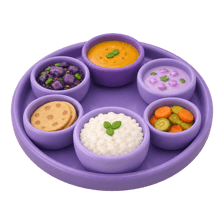
A hostel mess thali
A thali isn't one big dish. Rice, dal, sabzi and roti each sit in their own katori. You can refill or swap one without touching the rest. Components split your page the same way: header, card, button, each in its own little bowl.
Watch it happen
The component tree React builds
1/5React starts at the root. App is the first component it calls.
The big ideas
What you need to know
A component is a function
It takes some input and returns JSX. Start the name with a capital letter so React knows it's a component, not an HTML tag.
Write once, use anywhere
One Button component can appear fifty times. Fix a bug in it once and it's fixed everywhere.
Components nest into a tree
App renders Navbar and CourseList, and CourseList renders many CourseCards. Data flows down this tree.
Small and focused
If a component is doing three different jobs, it usually wants to be three components.
How it works
Splitting a screen into components
- 1
Draw boxes
Take a screenshot of the design and draw a box around every distinct piece.
- 2
Name them
Give each box a clear name, like SearchBar or ProductCard.
- 3
Build static first
Make each component render fixed data, with no state yet.
- 4
Wire in data
Pass real data down from the parent as props.
See it in code
Walk through the code
1function Avatar({ src }: { src: string }) {2 return <img className="avatar" src={src} alt="" />;3}4 5function ProfileCard() {6 return (7 <div className="card">8 <Avatar src="/riya.jpg" />9 <h3>Riya Sharma</h3>10 </div>11 );12}13 14export default function App() {15 return <ProfileCard />;16}1/3Avatar is the smallest piece. It takes a src and returns one img.
App renders ProfileCard, which renders Avatar. Each piece lives in its own function, so you can reuse, test or restyle it on its own.
Save yourself the pain
Common mistakes
Oops
Naming a component profileCard, with a small letter.
Do this instead
React treats lowercase tags as HTML elements. Always start component names with a capital letter.
Oops
Defining a component inside another component's body.
Do this instead
Define components at the top level of the file. A nested one is recreated on every render and loses its state.
Your mission
Break up a real screen
Quick check
You wrote a function called profileCard and used it as <profileCard />. Why doesn't it show up?
Go deeper
- 1Break a single large component into 3-4 smaller, focused components.
- 2Practice composing components together via `children`.
- 3Learn the convention of one component per file, named with PascalCase.
More topics at this stop
 JSX
 Props
 State
 Lifecycle
 Hooks
 Context API
 React Router
 Forms
 Controlled Components
 Refs
 Memoization
 Error Boundaries
 Lazy Loading
 Suspense
 Portals
 Custom Hooks
 Render Props
 HOC
 React Patterns

Stuck on this topic? Ask an Insider
Get 1:1 guidance from people who've walked this exact path — on the InsideEdge app.
