In short
Sticky headers, badges on a cart icon, a popup in the corner. When an element needs to break out of normal flow, position is the tool.
The `position` property (`static`, `relative`, `absolute`, `fixed`, `sticky`) controls how an element is placed relative to its normal flow or an ancestor. Positioning becomes easier when you understand containing blocks, normal document flow, stacking contexts, and how fixed or sticky elements interact with scrolling containers.
Think of it like this
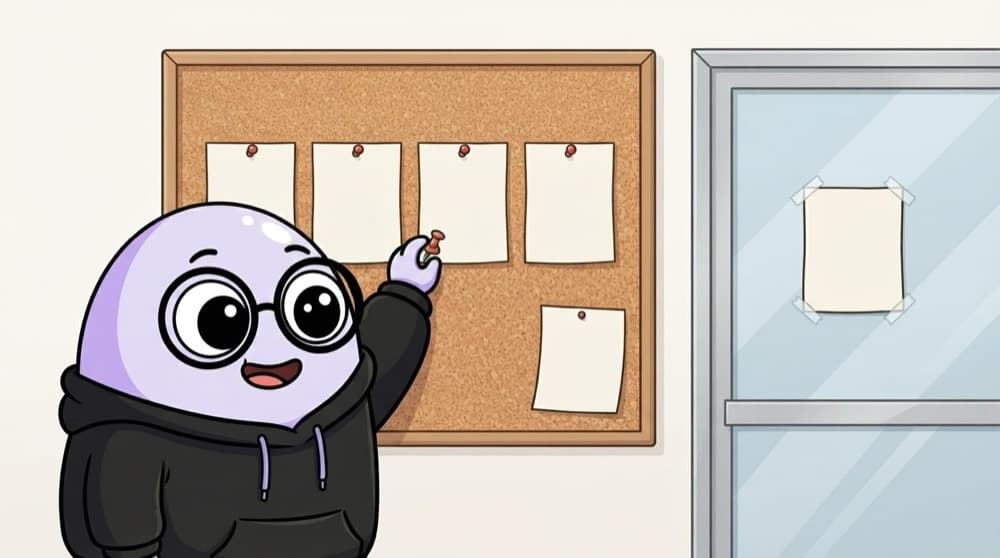
Notices on the college board
Most notices are pinned in order, one after another (static). A 'shifted' one is nudged a little from its spot (relative). One pinned to a corner of a frame is absolute. The one taped to the glass door stays put however you walk around (fixed).
Watch it happen
Where does an absolute badge anchor?
1/4The badge is position: absolute. It needs a positioned ancestor to measure top and right from.
The big ideas
What you need to know
static and relative
static is the default. relative keeps the element in flow but lets you nudge it, and makes it a reference point for children.
absolute
Taken out of the flow and placed using top/right/bottom/left, relative to the nearest positioned parent.
fixed
Stuck to the screen. It stays in place while you scroll, like a chat button in the corner.
sticky
Scrolls normally until it hits a set point, like top: 0, then sticks there. Great for table headers and navbars.
See it in code
Walk through the code
1.cart { position: relative; } /* reference point */2 3.cart .badge {4 position: absolute;5 top: -6px;6 right: -6px; /* sits on the cart's corner */7}8 9.site-header {10 position: sticky;11 top: 0;12 z-index: 10; /* stays above the content */13}14 15.chat-btn { position: fixed; bottom: 1rem; right: 1rem; }1/4relative keeps the cart in place but makes it the anchor for absolute children.
Without position: relative on .cart, the badge would fly off to the corner of the whole page instead.
Save yourself the pain
Common mistakes
Oops
Using position: absolute to build the whole page layout.
Do this instead
Use Flexbox or Grid for layout. Keep absolute for small overlays like badges and tooltips.
Oops
Wondering why sticky doesn't stick.
Do this instead
Sticky needs a top (or bottom) value, and a parent with overflow: hidden can block it.
Your mission
Positioning playground
Quick check
An absolutely positioned badge jumps to the top of the whole page instead of its card. What's the fix?
Go deeper
- 1Build a sticky header and a modal using `sticky` and `fixed`. Keep the first version small, then add one improvement after the core behavior works.
- 2Learn how `position: absolute` behaves relative to its nearest positioned ancestor. Focus on understanding the underlying reason it works, not only memorizing the definition.
- 3Practice layering elements with `z-index` and stacking contexts.
More topics at this stop
 Selectors
 Box Model
 Flexbox
 Grid
 Display
 Units
 Media Queries
 Animations
 Transitions
 Transform
 Variables
 Responsive Design
 Pseudo classes
 Pseudo elements
 CSS Architecture
 BEM

Stuck on this topic? Ask an Insider
Get 1:1 guidance from people who've walked this exact path — on the InsideEdge app.
