Wireframes vs Mockups vs Prototypes
Part of the Product Management Roadmap
In short
Asking for "a quick design" means very different things to different people. Knowing these three words saves days of the wrong kind of work.
Wireframes are low-fidelity structure, mockups are high-fidelity static visuals, and prototypes are interactive simulations of the real flow — each fits a different stage of the design process.
Think of it like this
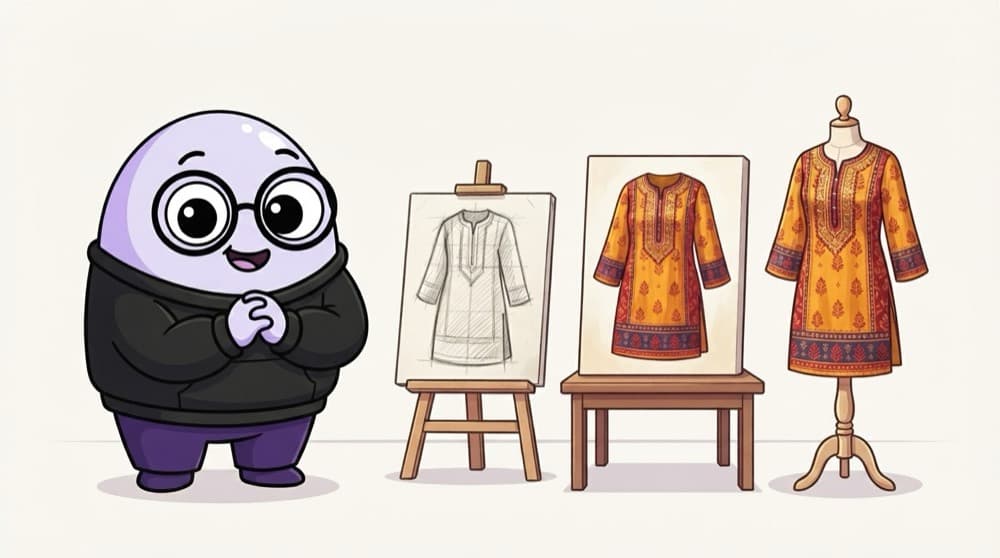
Getting a kurta stitched
First a rough pencil sketch: where the collar and pockets go. Then a coloured drawing with the real fabric and print. Finally a trial piece you can actually wear and walk around in. Structure, look, then feel.
Watch it happen
How fidelity grows
1/4Wireframe: grey boxes showing layout and content order. Cheap to change, great for arguing about structure.
The big ideas
What you need to know
Wireframes are about structure
What's on the screen and in what order. Don't comment on colours here.
Mockups are about look
Visual design, brand and copy. Good for stakeholder sign-off.
Prototypes are about flow
They can be low or high fidelity. What matters is that people can click through.
Match fidelity to the question
Ask the cheapest artefact that can answer your current question.
Save yourself the pain
Common mistakes
Oops
Giving colour feedback on a grey wireframe.
Do this instead
Ask about layout, hierarchy and missing content. Visual polish comes at the mockup stage.
Oops
Showing a polished mockup to users and asking "do you like it?"
Do this instead
Give them a prototype and a task, then watch where they get stuck.
Your mission
Make all three for one screen
Quick check
You want to know if users can finish a 3-step signup without help. What should the designer make?
Go deeper
- 1Find examples of each fidelity level for the same hypothetical screen.
- 2Learn when it's wasteful to jump straight to a high-fidelity mockup.
- 3Understand why prototypes are what you'd use for a usability test, not a mockup.
More topics at this stop
 Design Thinking
 UX Principles
 Figma Basics for PMs
 Design Systems
 Nielsen's 10 Usability Heuristics
 Accessibility Basics
 Information Architecture
 Working With Designers
 Giving Useful Design Feedback

Stuck on this topic? Ask an Insider
Get 1:1 guidance from people who've walked this exact path — on the InsideEdge app.
